

 4.3
4.3




About Grammarly-AI Writing Assistant
Grammarly is more than just a grammar checker—it’s your personal writing assistant, proofreader, and communication coach, all packed into one powerful app. With over 50 million downloads, it has become the go-to tool for anyone who wants to write clearly, confidently, and without mistakes, whether for school, work, or everyday communication.
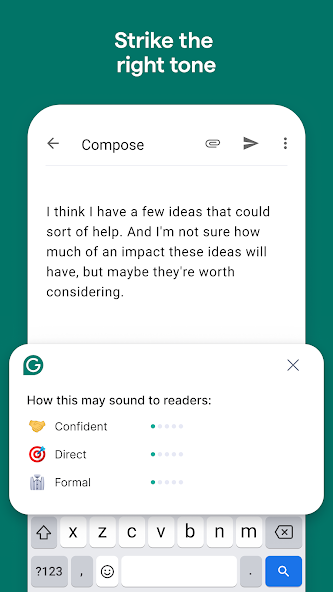
From quick text messages to professional emails, Grammarly ensures every word you write reflects exactly what you want to say. It doesn’t just correct mistakes; it helps you improve your writing in real time, offering clarity, fluency, and even tone suggestions so your message comes across the way you intend. With AI-powered rewrite tools, Grammarly can reframe your sentences, suggest stronger vocabulary, and help you sound more descriptive, confident, or formal, depending on the context.
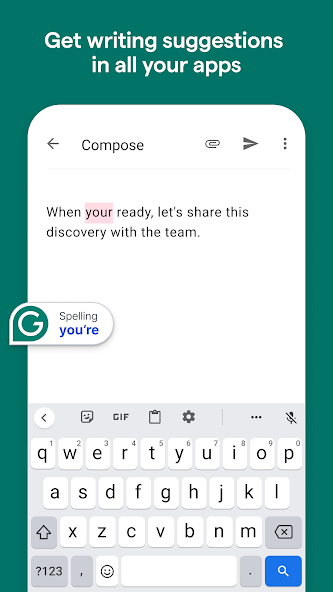
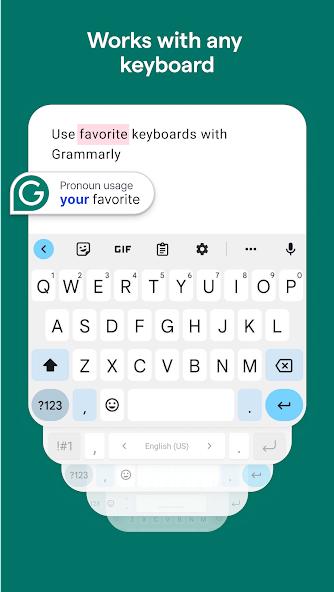
The app works seamlessly with Android keyboards like Gboard and SwiftKey, meaning you don’t have to switch apps or do extra work. Just type naturally, and Grammarly runs in the background, giving you instant corrections and insights. From LinkedIn posts and resumes to tweets, essays, and creative writing, Grammarly adapts to your needs and elevates your words with professional polish.
Write smarter with real-time corrections.
Grammarly’s grammar checker, spell checker, and punctuation tool make sure your writing is always mistake-free. Every correction comes with a clear explanation so you understand why it’s suggested. Over time, this helps you learn from your mistakes and develop stronger writing skills naturally. The AI engine even adapts to your style, offering personalized feedback that feels tailored to your writing habits.
Need to adjust tone or style quickly? Highlight your text, tap “improve it,” and Grammarly’s generative AI will instantly create new versions—whether you want something shorter and snappier, more detailed, or more professional. This makes it an essential tool for everything from academic writing to casual social media updates.
Unlock more with Grammarly Premium.
While the free version covers all the basics, Grammarly Premium takes your writing to the next level. It offers advanced vocabulary suggestions to replace overused words, fluency improvements to make your writing smoother, and tone adjustments so your text sounds more engaging or authoritative. Premium also fine-tunes formality levels, ensuring your message fits the situation—whether you’re writing a formal report or a casual email. These tools don’t just fix mistakes; they transform good writing into exceptional communication.
With Premium, you’ll also gain access to more personalized feedback, deeper analysis of your writing, and stylistic suggestions that help your content stand out. For professionals, students, and anyone who relies on strong writing, the upgrade quickly proves its value.
Privacy, security, and trust at the core.
Grammarly is built with security in mind. All your writing is encrypted, and the company follows strict user trust guidelines to protect your data. Your information is never sold to advertisers, and corrections are delivered without compromising your privacy. Whether you’re drafting sensitive business emails or personal notes, you can trust Grammarly to keep your content safe.
Accessibility permissions are used only to process text and provide assistance while you type in apps. This ensures Grammarly is always available where you need it—without requiring complicated setup or intrusive steps.
Why Grammarly stands out.
Competing tools may catch basic typos, but Grammarly goes far beyond. It combines grammar correction, AI rewriting, tone detection, and vocabulary enhancement in one intuitive app. It doesn’t just correct—it teaches, adapts, and empowers you to write better over time. That’s why millions of users worldwide rely on it daily for both personal and professional communication.
【Key Takeaways】
✅ Pros:
Real-time grammar, spelling, and punctuation corrections across all apps
AI-powered rewrite tool creates multiple improved versions of your text
Works seamlessly with Android keyboards without switching apps
Premium features enhance vocabulary, clarity, tone, and fluency
Strong privacy policies and encryption ensure data safety
Easy-to-understand explanations help you learn and improve over time
⚠️ Cons:
Free version is limited compared to Premium’s advanced features
Some suggestions may feel too formal or unnecessary in casual writing
Requires internet connection for most advanced features


Pros
Free: Unlike Netflix or Hulu, Tubi is 100% free thanks to ad support that is less irritating than your average cable.
No Credit Card and Hassle: No credit card or account sign up necessary; users can begin watching free or paid content in seconds, by providing their payment information, eliminating one of the biggest barriers to entry.
High-Resolution Streaming: Enjoy clear picture quality with 720p streaming on the go from your device to TVs for great TV time.
Original Content: Presents 100+ original titles in thriller, sci-fi, and Black cinema with more than just licensed films.
Offline Viewing: The service and users need third party tools such as CleverGet Tubi Downloader to download videos for offline playing and that too in MP4/MKV format.
Extra Convenience: The app simplifies and creates convenience in parking with virtual payment or remotely top up e-wallet and the bother of carrying any change or going back to the meter is avoided.
Global Presence: PayByPhone is accepted globally in 1000+ cities across the globe in the US, Canada, UK, France and some other European countries, making it ideal for when you travel.
User Friendly: The app is user-friendly and intuitive to use for both setup and payments.
Safety: PayByPhone applies top level encrypted system and provides security assurance so your payment information is protected, it may be safer than carrying cash.
Saves Time: It takes far less time to point out the potential errors directly during the grading process instead of proofreading the entire paper afterwards
Teaching Tool: Each fix comes with a short explanation and links to complete grammar lessons on the topic, so a flub in your writing can be like your own personal tutor.
Cross-Platform Sync: Work across Windows, macOS, iOS, Android and the web, the ability to have your personal dictionary and style guide follow you on all your devices.
Boosts Confidence: Non-native learners in particular feel safer as stupid mistakes have no chance, thereby removing any writing anxiety.
Team Efficiency: Standardize requirements and functionality across departments to exhale a cohesive brand voice with style guides,are snippet libraries.
Clean and User-Friendly Interface: The page is very easy to use with a clean, minimalist design which is not bombarded with overbearing ads nor strict requirements for you to sign up before you can download music.
Lowers Targeted Advertising: It blocks the trackers and does not build up user profiles to stop targeted ads from following you around the web, making it a less cluttered browsing experience.
Faster Browsing: By blocking trackers and unwanted scripts, Brave has been able to streamline data and speed up your experience so, you can spend less time waiting.
Free to Use: The main search engine, browser, and many of the privacy features are available completely free to desktop and mobile users.

Cons
Ad-Supported Model: All ads must be unable to be skipped, and there is no paid, ad-free offering.
Slim New Releases: The library is heavy on older content, with far less recent blockbusters and trending series than paid services offer.
Convenience Fees: The most obvious drawback is that PayByPhone charges an on top of convenience per transaction, which might take a bite out of your wallet after a period of time.
Completely Reliant on Internet: The app is not going to work without internet and the app can only be utilized on a smartphone that is up to date.
Cost: Advanced suggestions (clarity, tone adjustments, even plagiarism) are behind the premium pay wall.
Context Blindness: AI can struggle to pick up on nuances in some cases, mistranslating between creative linguistic phrases, technical jargon or the facilitation of idioms causing translations that blurs nuance or meaning.
Less Comprehensive Searching Results: Some repetitions, less relevant searches.
No Browser Add-on's Support: Unlike many popular browsers, Add-on's aren't supported for the DuckDuckGo browser.
Ratings
This number is based on download statistics from Google Play and may include historical
data.